
Learn how digital signage for retail stores is set up, managed, and scaled across one or multiple locations with the right screens and systems.

Rolling out a new technology in a retail environment can feel like a daunting logistical challenge. Whether you are a single-site boutique in a local arcade or a national franchise with fifty locations across the country, the goal is the same: to modernise your customer experience without creating an operational headache.
Digital signage for retail stores has evolved significantly over the last decade. It is no longer just about hanging a television on a wall and playing a USB stick on repeat. Today, it involves a cohesive ecosystem of commercial-grade hardware, sophisticated content management software, and strategic store layouts designed to guide the customer journey.
When executed correctly, a digital signage rollout transforms the look and feel of a physical store, bridging the gap between online agility and in-store presence. This guide will walk you through exactly what a robust system includes, how to map out your store layout, and the realities of managing content across a network of screens.
To build a successful network, you need to look beyond the screen itself. A complete retail store digital signage solution is made up of three distinct pillars: Hardware, Software, and Connectivity.
The foundation of any setup is the screen. As detailed in previous guides, relying on consumer-grade TVs from an electronics retailer is a recipe for failure. A proper setup utilises Commercial Information Displays (CIDs) from manufacturers like Samsung or LG. These panels are rated for 16/7 or 24/7 operation and feature robust thermal management.
Crucially, modern commercial screens often feature "System-on-Chip" (SoC) technology. This means the computer required to run your content is built inside the screen. This eliminates the need for external media players, reducing the amount of cabling required behind the wall, a vital consideration for clean, minimalist shop fit-outs.
If the screen is the body, the CMS is the brain. The Content Management System is the software platform that allows you to upload images and videos, schedule when they play, and deploy them to your screens.
For a retail rollout, you need a CMS that is cloud-based. This allows a marketing manager at Head Office in Sydney to push a new summer promotion to screens in Perth, Melbourne, and Brisbane instantly, without needing to call the store staff. Platforms like Fusion Signage or proprietary cloud solutions are standard in the industry, offering a dashboard where you can see the health status of every screen in your fleet.
A often-overlooked component is the infrastructure. Digital signage systems for retail require stable internet connections to download new content. While many screens have Wi-Fi, a hardwired Ethernet connection (LAN) is always recommended for stability, especially when downloading heavy 4K video files.
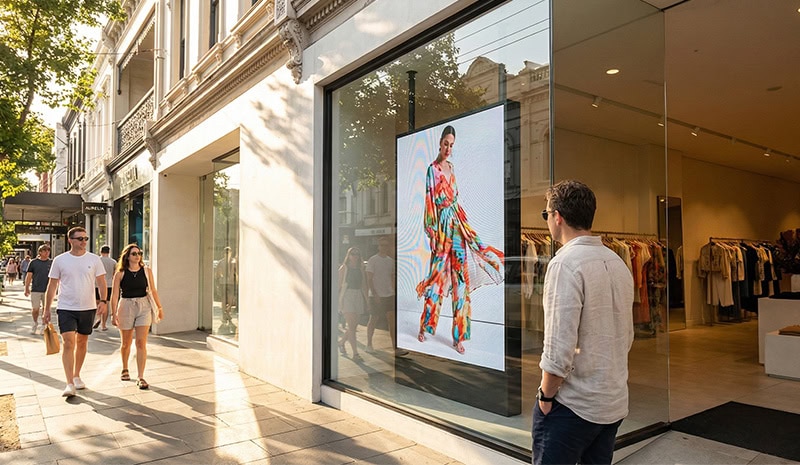
A successful rollout isn't just about where you can fit a screen, but where it will have the most impact. When planning your digital signage for retail stores, it is helpful to think in terms of "zones."
This is the handshake with the customer. The goal here is to stop traffic.
Hardware: High-Brightness Screens (500 - 4,000 nits) or LED window displays.
Placement: Facing outwards towards the street or shopping centre concourse.
Example: Fashion retailers like Bailey Nelson utilise high-brightness screens in their windows. By replacing static lightboxes with motion video, they cut through the visual noise of a busy shopping centre, drawing the eye of potential customers before they even enter the lease line.
Once the customer steps inside, the goal shifts from attraction to atmosphere.
Hardware: Video Walls or Large Format Displays (75”+).
Placement: Feature walls visible immediately upon entry.
Example: The Good Kid in Parramatta utilises a massive 75-inch Samsung commercial display housed in a custom-built enclosure. This screen acts as a digital anchor for the store, playing high-definition brand campaigns that set the vibe and validate the premium nature of the products.

Here, the customer is browsing. The goal is product education and inspiration.
Hardware: Standard Indoor Screens (43” - 55”) or Touchscreens.
Placement: End-caps of aisles, near key product launches, or on pillars.
Strategy: These screens act as silent salespeople, showing product demonstrations or "how-to" videos that help customers make a purchasing decision without needing to wait for staff assistance.

The final step in the journey. The goal here is upselling and reducing perceived wait times.
Hardware: Digital Menu Boards or smaller POS screens.
Placement: Behind the counter (overhead) or on the counter itself.

The complexity of your rollout will depend heavily on whether you are installing a standalone unit or an integrated multi-screen network.
For smaller boutiques or cafés, a single, high-impact screen is often enough.
Ease of Setup: High. Often requires only power and Wi-Fi.
Management: Can be managed via a simple USB stick (though not recommended for long-term) or a basic mobile app connected to the screen.
Best For: Small footprints where wall space is at a premium. The focus here should be on size and integration—making sure the one screen looks like it belongs there. The custom enclosure used by The Good Kid is a perfect example of treating a single screen as a piece of architectural joinery rather than an appliance.
For larger retailers, showrooms, or franchises, a multi-screen setup is standard. This might include a window screen, a video wall, and three counter screens.
Ease of Setup: Moderate to Complex. Requires coordinated electrical work and data cabling plans before the plasterboard goes up.
Management: Requires a commercial CMS licence. You need the ability to group screens. For example, you might want to send one piece of content to all "Window Screens" and a different piece of content to all "POS Screens."
Best For: Creating an immersive brand experience. ARB Stores are a prime example of this. By utilising a 2x2 video wall, they create a massive canvas that dominates the showroom. However, this setup requires precise calibration to ensuring the colours match perfectly across all four panels, creating a seamless image.
The hardware is only as good as the content playing on it. One of the biggest advantages of digital signage systems for retail is the ability to centralise control.
Gone are the days of mailing USB sticks to store managers and hoping they plug them in. With a cloud-based CMS, your marketing team can log into a web portal and see a map of all your stores.
Scheduling: You can program content to expire automatically. If a sale ends on Sunday at 5:00 PM, the screens will automatically revert to standard pricing at 5:01 PM.
Day-Parting: As seen with Sana Mediterranean, you can schedule different playlists for different times of the day. A café can promote coffee in the morning and lunch specials at noon without staff needing to touch a remote control.
A common debate in retail rollouts is how much control to give the local store manager.
Centralised (Head Office): Ensures brand consistency. Fonts, colours, and messaging are always on-brand.
Localised (Store Manager): Allows for agility. A store manager might want to promote a "Manager's Special" to clear excess stock of a specific item.
The Hybrid Solution: sophisticated CMS platforms allow for a hybrid approach. Head Office controls 80% of the playlist, but the local manager is given a rigorous template where they can update text or prices for a specific local offer, ensuring the design stays professional.
When planning a rollout, the physical installation is often where projects face delays if not planned correctly. Whether you are refitting an existing shop or building a new one, the installation of retail store digital signage requires coordination between your AV provider, your shopfitter, and your electrician.
Commercial screens are heavy. A 75-inch professional display or a video wall cannot simply be hung on a standard Gyprock wall with rawl plugs.
Backing: You must install structural ply or noggins behind the plasterboard at the exact height of the screen mount.
Recessed Niches: To achieve a sleek look, many retailers recess their screens so the face of the display is flush with the wall. This requires precise measurements of the screen depth and the mount depth. The custom work at The Good Kid highlights how critical this fit-and-finish is—if the gap is too large, it looks messy; if it's too tight, the screen can overheat.
Visible cables are the enemy of retail aesthetics.
Power Location: Power points should be installed behind the screen, specifically recessed into the wall so the plug doesn't push the screen forward.
Data Cabling: Even if you plan to use Wi-Fi, running a Cat6 ethernet cable to the screen location is industry best practice. Wi-Fi in shopping centres is notoriously crowded and unreliable. A hardwired connection ensures your content downloads seamlessly every time.
Finally, consider what happens when a screen goes dark. In a retail environment, a blank screen is a bad look.
Commercial Warranty: Unlike consumer TVs, commercial displays come with a 3-year on-site warranty. This means if a screen fails, the manufacturer comes to you.
Remote Troubleshooting: If you use a professional CMS, your AV provider (like Display Australia) can often log in remotely to reboot the screen or update the firmware, fixing issues without ever needing to send a technician to the store.
Implementing digital signage for retail stores is a powerful way to modernise your brand and connect with customers. However, success lies in the planning. It requires choosing the right commercial hardware that can handle the environment, designing a layout that enhances the customer journey, and implementing a software system that makes management effortless.
From the high-brightness window displays at Bailey Nelson to the immersive video walls at ARB, the evidence is clear: when you invest in a proper system, you gain a dynamic communication tool that drives sales and elevates your in-store experience. Whether you are opening your first store or your fiftieth, taking the time to plan your rollout strategy will ensure your screens are an asset, not an afterthought.
